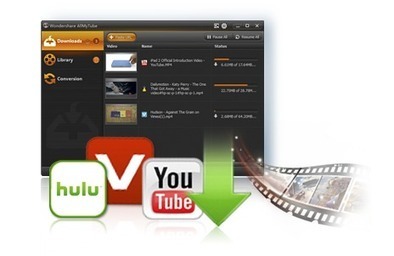
Robin Good: VDownloader is a free Windows sooftware that allows you to download a copy of your favorite videos from YouTube, Hulu, Vevo and other sites.
VDownloader acts also as a good FLV and MP4 video player.
No registration required.
Free to use.
N.B.: You may also want to try out www.wontube.com where you can search for any video and download it immediately straight from the web.
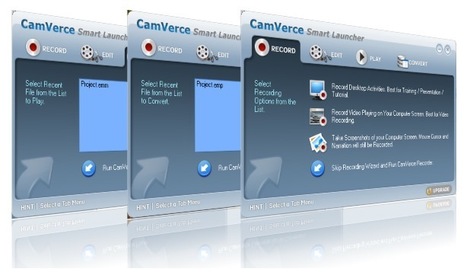
Robin Good: Camverce is a Windows-only screencasting software that allows you to record all of your computer desktop activities including your mouse cursor and your voice.
Not only. Camverce can also
a) annotate the screen as you record,
b) record any video playing on your computer, whether it is local or being streamed by another web site, and
c) capture high quality screenshots, thanks to a unique scree-capture codec it is has developed.
Camverce makes it possible, though an integrated suite of small apps to aso edit recordings and to convert/export them to your preferred video file format (ASF, WMV, AVI, MOV, RM, SWF).
Robin Good: If you are trying to find out how you can best legally protect the ownership of your video content, by using the laws and procedures available in the US, this article is an excellent guide for those just starting on this front.
"An original work of art, such as a video, music, screenplay, or script, is automatically protected by the laws of the U.S. Code, title 17 as soon as you create the work.
However, for added protection, you should place a copyright notice on your script and register it in the U.S. Copyright Office because that registration is necessary to bringing a lawsuit for copyright infringement.
The so-called "poor man's copyright" - mailing a copy of your work to yourself to obtain a postage date - is not adequate to secure registration, and cannot be used in a court of law to support a case o f copyright infringement."
I personally think that it is not a good idea to go the extra mile to protect once own content in this way, if it is published on the Internet and you want it to get maximum exposure and visibility.
But if you have the time and resources to go after your potential future copyright infringers, you are going to get lots of useful information in this introductory guide.
Learning the procedure of copyrights, trademarks, patents, etc. is just the beginning. Knowing when they apply, and being able to pay the fee, monetize the work, and protect it is the end goal.
This seems to be a reliable source. They have a large social media following, and have endless content in regard to the music industry, and especially audio and video!
I would not consider them a major source, but definitely on the charts!
Television progress continues. In the late 1990s, the ITU defined the parameter values for HDTV and the 720p families.
At its meeting in May 2012, ITU-R Working party 6C, the same group, made the leap forward to the parameter values for the next two generations of television formats.
These are the (current name) 4K and 8K UHDTV formats - Ultra High Definition Television.
The new formats take advantage of future displays' greater colour range, have the option of 'constant luminance' encoding, and allow up to 120 pictures/second. They are constructed as multiples of the 1920 x 1080 format in ITU-R Rec. 709.
Robin Good: Clesh is a web-based professional video editing system which can be run from any Mac, PC or Linux computer without the need to install any software.
Robin Good: The aiRCam GP is an economic prototype and yet to be funded remote-controlled skycam/flycam system that can utilize small point and shoot video cameras like the GoPro.
Key features:
Light-weight
Incredible Value
Easy to set-up
Variable Speed Motor
Pan and Tilt Head
Designed around GoPro but accepts many point and shoot cameras.
Rugged with replacement parts available
The project is up at Kickstarter trying to rig $75,000 to put this little monster under production.
From the official announcement: "Today we're excited to launch Hangouts On Air to Google+ users worldwide. So if you have something to say—as an aspiring artist, a global celebrity, or a concerned citizen—you can now go live in front of a global audience.
With just a few clicks, you’ll be able to: Broadcast publicly. By checking "Enable Hangouts On Air," you can broadcast your live hangout—from the Google+ stream, your YouTube channel or your website—to the entire world.
See how many viewers you’ve got. During your broadcast, you can look inside the hangout to see how many people are watching live.
Record and re-share. Once you're off the air, we’ll upload a public recording to your YouTube channel, and to your original Google+ post. This way it's easy to share and discuss your broadcast after it's over.
Of course, launching millions of live stations takes some doing, so we're rolling out Hangouts On Air gradually, over the next few weeks."
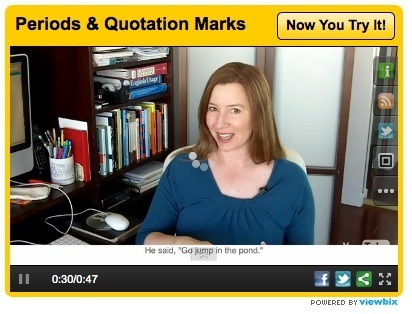
Robin Good: Viewbix is a new web app which allows you to integrate branding, call to actions, offers and other interactive apps to any video coming from YouTube, Vimeo or Facebook.
"Viewbix lets you add interactive apps to your videos that engage viewers and drive calls to action.
The apps overlay dynamic content on top of your YouTube, Vimeo Pro or Facebook videos to create a rich viewing experience that can be shared across the web, social and mobile platforms."
Add branding, a call to action and share across the web, social and mobile platforms.
"More than 20% of the viewers who watch a Viewbix video click on the call to action or engage with at least one of the apps inside the player.
Viewbix tracks and reports each interaction so you can optimize your players and achieve the measurable results you want."
Viewbix is based on a freemium model. It currently offers its base product for free but will shortly be charging a monthly fee for branded players, premium apps and detailed analytics.
Robin Good: EPIC expands its line of wearable adventure video camcorders with the new EPIC 1080.
With the ability to record in stunning 1920x1080 high definition, the EPIC 1080 captures all the action of the hunt with sharp, high-resolution video and crisp, clear audio.
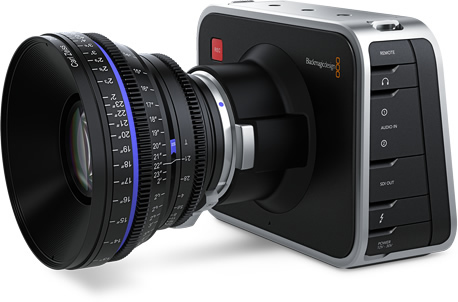
Robin Good: The Blackmagic Design Cinema Camera, is a 2.5K/1080HD camcorder that records uncompressed RAW, ProRes and DNxHD and features a built-in SSD-based video recorder that costs $2,995.
Key features include: -> Super wide 13 stops of dynamic range -> Opitcal sensor is a Micro 4/3" (refrigerated for low noise) -> On-board solid state recorder -> Built-in Thunderbolt connectivity -> 3 Gb/s SDI output -> a copy of UltraScope for waveform monitoring -> a full copy of DaVinci Resolve (a $995 value right there).
"You also get a nifty touchscreen display, newsworthy in its own right, that combines the form factor of an external recorder with the ease of an iPhone or iPad.
...
Blackmagic has worked very closely with Apple for some time, evident in Blackmagic's streamlined designs and user interfaces, as well as the company's embrace of ProRes and Thunderbolt.
"This camera, like the other devices announced during the show, will connect directly to FCPX. Metadata will be king."
...The only early test footage out there is on Vimeo and comes from Australian cinematographer John Brawley, who continues to shoot internal engineering tests for Blackmagic.
Depending on the setup or your perspective, it can look like a DSLR-type camera, a studio camera—like the configuration shown above (there's also an optional sunvisor)—or a handheld camera that is balanced by another cleverly designed Blackmagic handle rig (top)...
Blackmagic is positioning its new camera directly at high-end television commercials, episodic television and feature films."
Robin Good: For Windows PC users ActivePresenter may prove to be an interesting alternative, with lots of useful features at a price that can't be beaten.
And when you want more options, like extra export formats, or the ability to produce PowerPoint presentation as final output, the Standard and Pro editions come to the rescue.
With ActivePresenter, not only you can record your computer screen along with your own audio narration, but you can also capture screenshots automatically with mouse clicks or key presses and
automatically generate appropriate annotations for each action.
Even the free version has no watermarks or time limitations.
Other features include:
- Attractive callouts
- Annotations for explaining each action - Changing mouse cursor path - Remove/change unneeded parts - Add more video overlays - Sync audio, video and overlays - Closed Captioning
- Make it interactive by adding application simulations, branching scenarios, and quizzes - Easily publish to the web, desktops, mobile devices, and leading SCORM-compliant Learning Management Systems - Track and report key metrics to evaluate learner performance
Supported output formats: AVI, MP4, WMV or WebM (supported by Youtube)
Three editions available:
- Free Edition: Can create video (AVI, MP4, WMV, WebM) - Standard Edition: as Free + output in Flash Video (FLV), Microsoft Word, Microsoft Excel, Adobe PDF and HTML output - Pro Edition: as Standard + the capability to create interactive AJAX, Adobe Flash simulations and Microsoft PowerPoint presentations.
N.B.: The Free Edition has almost all the features as in the Standard or Professional Edition, except the export capability.
Robin Good: The use of cinematographic techniques can likely bring lots of new opportunities, and space for understanding, discovering and appreciating objects even when they are not physically present.
From the original blog post: "The studio is continually interested in the beautiful and inventive stuff that can happen when you poke and prod around the edges of technology and culture.
...
Early last year we were experimenting with product photography for a retail client pitch.
We wondered how we could we use cinematic techniques to explore product imagery.
What would happen if instead of a single product image or a linear video, we could flick and drag our way through time and the optical qualities of lenses?
What if we had control of the depth of field, focus, lighting, exposure, frame-rate or camera position through tap and swipe?"
Robin Good: This is HOT for anyone wanting to live video stream from just about any location without needing to carry a computer to do so.
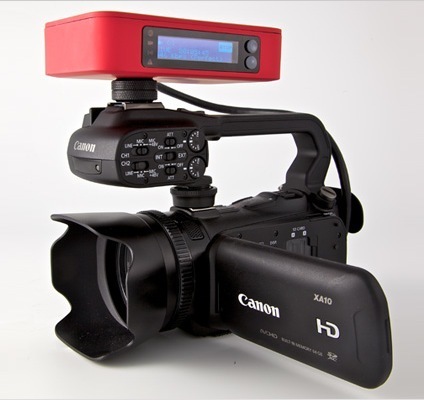
This new small red box does everything you need to encode in real-time the HDMI output of your camcorder and to stream it live (up to 2.3Mbps) to the new Livestream video service.
Livestream Broadcaster supports 3G/4G, WiFi and Ethernet direct connections and it will shortly announce a number of selected telecom providers in the US and Europe that will be compatible with this system.
The red box costs $495 for the firsth three months and then $45/mo thereafter and it will be be available from the end of May in the US and Europe.
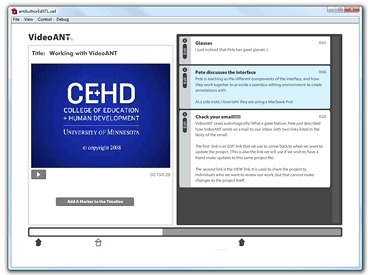
Robin Good: VideoAnt 2.o is a web-based video annotation tool which allows you to synchronize the display of text-based content next to specific points in the video.
Nick Peachey reports: "This is an online tool for adding time line based text annotations to online video.
The tool then converts these to a FLV file and sends them to you.
Too confusing. Not much written on the website. 14 minute instructional video in the application itself is too long. Tried it with 2 YouTube videos. Nice idea, but maybe a bit premature for teaching in a practical setting.
Robin Good: If you re looking for a free Windows alternative to MovieMaker, EZVid offers a fully-free downloadable software capable of basic video editing, creation of video slideshows and screencasts, and direct upload to YouTube.
Ezvid can import still images and video, and can upload finished videos to YouTube. No registration is required to download or use. Free soundtrack music is included.
Major file formats supported including PNG, JPEG, and BMP, video formats MOV, WMV and others, and camera or mobile phone files.
System requirements: Windows XP SP3 / Vista / 7 / 8
Robin Good: Google Hangouts On-Air is finally live and accessible inside my Google + account.
You can check whether you can now live stream from Google+ and YouTube by logging in inside your G+ account and creating a new hangout. If you see the checkmark allowing you to activate the "on-air" feature, you are all set.
From the official site: "Vyclone is a mobile video app that lets you co-create, sync and share movies with people around you."
From TheNextWeb review: "Vyclone is a free iOS app (UK-only for now), that professes to let you “Record life from all angles” – in short, it lets users collaborate from different locations and perspectives to “co-create, sync and share movies”.
Vyclone lets you upload a clip to its servers, where other users can throw their own shots into the mix to create a crowdsourced movie encompassing, literally, different points-of-view. Once you’re in you can browse existing videos, or start shooting footage yourself.
It’s worth noting that once you upload a video for the Vyclone-using public to access, others can remix it and do as they please.
You can choose what content you want to share publicly through Vyclone, and whether you want to keep it private between you and your buddies. If you don’t choose ‘public’ or ‘private’, it will default to the former.
A nice little feature is that you can search for movies that have already been created nearby, which obviously lends itself well to event-specific video collaborations.
Once you’re done shooting or remixing the movie with the built-in editing tool, you can choose to broadcast your movie across all the usual social networks.
It’s worth noting that the app is UK-only for now, though as The Guardian notes, a full-scale launch should happen this year. And an Android app is in the works too..."
Robin Good: Evinar is a new app that allows you to live stream your show, webinar, performance or event on your Facebook Page and to sell tickets for it.
Key features include:
Moderated chat
Facebook comments integration
Transitions and animation effects
Analytics
Here is how it works:
1. Create your show on Evinar Set the date, time and ticket price for your show.
2. Get The Word Out Evinar let's you announce the show to all your fans worldwide in seconds.
3. Fans Buy Tickets Your fans buy the tickets for your show online and you earn money right away.
4. Show Time Do a soundcheck, get on the stage and perform to hundreds of waiting fans.
Spesso musicisti di jazz mi chiedono come utilizzare internet per aumentare la propria popolarità. Evinar è un'applicazione che può aiutare e quindi da provare!
Sempre più spesso avremo la possibilità di seguire in live streaming i concerti del nostro gruppo preferito: chi anticiperà i tempi non potrà che avere un notevole vantaggio e aumentare i propri fans!
Come sempre fra i musicisti italiani più attenti alle nuove possibilità Paolo Fresu che, il 18 dicembre, sarà protagonista di Jazzy Christmas: concerto in quintetto con ospite il bandoneonista Daniele Di Bonaventura. Il concerto sarà trasmesso grazie aStreamago: http://www.streamago.tv così, chi non potrà essere presente di persona al concerto, avrà la possibilità di ascoltarlo e vederlo in live streaming.
Robin Good: Hamster Free Video Converter is a downloadable free video converter (Windows-only) capable of taking any type of video file and converting it in your specified format or for your specific device (iPhone, tablet, etc.).
Supports: 3GP, MP3, MP4, AVI, MPG, WMV, MPEG, FLV, HD, DVD, M2TS and other formats with integrated video player & DivX+ codecs
"Converts any video to run on iPod, iPad, iPhone, PS3, PSP, Blackberry, xBox, Zune, Apple TV, iRiver and more"
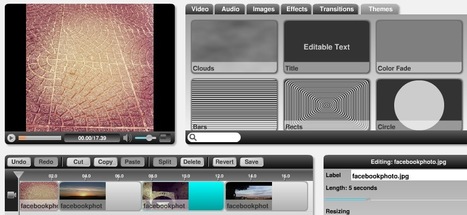
Robin Good: Memplay is a free web service which allows you to collaboratively upload images, video and audio files, and then to edit these into a final video.
Images and other media files can be imported directly from your computer as well as from your Facebook galleries.
Once you have uploaded all of your audio, video and image resources you can use the web-based video editor to assemble easily your final video.
Memplai provides integrated effects, transitions and video templates.
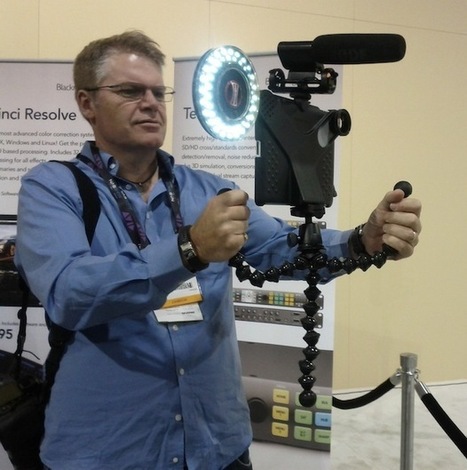
From the original article: "Ever since I saw the 3rd-generation iPad (2012), I began to have visions of its use for video journalism.
Many of ProVideo Coalition magazine readers sent me private enthusiastic comments about my pre-NAB iPad articles like Avid now lets you edit video on your iPad for US$4.99. Should you?
Why an iPad is like a 4×5 view camera, and why you’ll need a black “focusing cloth” and later part 1 of my review called 1st handheld dynamic microphones with hybrid XLR/USB/iPad connectivity from Audio Technica.
...
Ahead you’ll find several photos, a few videos, and comments about various iPad video accessories."
From the article intro: "In January 2012, we announced the launch of our online resource, The State of HTML5 Video Report.
...
Three months after its initial launch, we have updated the report with some very interesting findings.
First, you will find a new JavaScript section, dedicated to video scripting using the video tag. Common use cases for this are the rendering of custom controls (like JW Player does) or page interaction with the video timeline (like Popcorn.js does).
Second, you will find all existing tests updated with results from the latest browsers and mobile platforms. We highlight some interesting findings below."
Robin Good: YouTube has released a new set of features for video-makers of all levels which allow you to replace your video's soundtrack for free with a song from the YouTube library of hundreds of thousands of audio tracks.
To try it out, go to your Video Manager, select Edit, select Enhancements, then select Audio.
From IBTimes: "In the latest update to the video-sharing site, YouTube is rolling out new audio editing tools that will make it easier for uploaders to layer several audio tracks on top of one another.
Prior to the update, YouTube offered an AudioSwap feature that let users replace a video's audio track with one of the company's thousands of licensed audio tracks.
The new update has catapulted YouTube's licensed track count to more than 150,000.
The update will also give YouTube uploaders the ability to adjust volume levels on each track .
...
Prior to the latest update, users could add licensed tracks to videos, but the audio levels could not be adjusted -- it would simply replace the video's audio track.
The latest audio editing tools will be rolled out over the next few days. To try them on the video's you've uploaded, go to "edit settings" from the video manager."
Being able to add soundtracks to your own videos that you upload to youtube is amazing. Youtube has this feature so you can do just that for free. You have a large variety of different soundtracks to choose from.
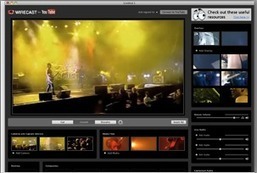
From the official YouTube blog: "This new software is free for YouTube partners and allows you to produce and stream professional-looking live events directly to YouTube from your desktop.
It allows capture and switching between multiple video and audio sources, roll in of media files and images and add live effects and overlays.
If you’re enabled for livestreaming, you’ll see a link to download Wirecast for YouTube in your YouTube account."
Robin Good: Screenbird is a new tool which allows you to easily record your computer screen (and your audio) to create video tutorials, guide or lessons on how to use a certain software or service.
Screenbird requires no downloading or setting up any software. It works right out of the box through Java by providing a very simple control bar to start, pause, stop and finalize your recordings.
Once completed a screencast can be automatically uploaded to your YouTube account, or it can be saved and downloaded to your hard disk in .MP4 format.
Two versions are available: Basic, free for all and Premium.
The Basic version includes:
YouTube integration
Short Links Up to 30min Videos Play on any device Record screen or just a part Record Audio Account Video Limit: 150min Video Expiration: 6 months Users Per Account: 1
To get content containing either thought or leadership enter:
To get content containing both thought and leadership enter:
To get content containing the expression thought leadership enter:
You can enter several keywords and you can refine them whenever you want. Our suggestion engine uses more signals but entering a few keywords here will rapidly give you great content to curate.


 Your new post is loading...