Robin Good: If you are looking for a video editing tool for your iPad you should not let go this unique opportunity. Pinnacle Studio is now available for free - for a limited time - inside the App Store.
Blazing fast. 1080p rendering. More intuitive and more precise film splicing than iMovie. Total control over the soundtrack.
Robin Good: Sketchcasting is a new feature inside Sketchpad.cc that allows anyone to record a screencast of a code-writing session.
If you are programmer, developers, student or teacher, you may have found already the need to show and explain to someone else how you have coded something and what kind of results or problems this can cause.
The Sketchcast feature allows you to record both your code-writing session as well as your own voice, so that you can explain what you are doing with the code.
1) Anyone can record a sketchcast. Open the normal code editor, press “record”, and talk as you code. You’ll get a unique URL to share with others.
2) Sketchcasting is collaborative. Groups of people can code together while recording a sketchcast, and groups of people can code together while experimenting with forked versions of existing sketchcasts.
3) All viewer comments and Q&A are automatically time-coded. While I’ve argued for and hand-built time-anchored Q&A learning tools in the past, I got it here for free as a part of the excellent Soundcloud audio player.
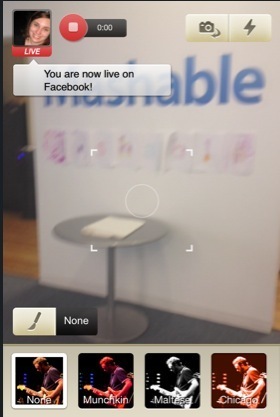
Robin Good: Broadcast for Friends is a new video streaming app from Ustream which allows to send live video from your iPhone to your Facebook page.
From the Mashable review: "...Videos can be recorded using either the forward-facing or rear-facing camera on your phone, and there are a number of built-in filters — which can be changed while you film –- in order to give your video a distinctive look.
A free download, signing up for BFF simply requires you to authorize the app via Facebook, a natural move since your ultimate goal will of course to be to broadcast the video you record onto the social network.
...An Only Me, Friends, and Public option shows up before you start, letting you decide how your video is shared.
...Once you select a privacy setting there’s a 3-second countdown and then you’re streaming live.
...Videos are only saved to your Facebook profile if you choose to save them once you’re done filming.
...As you’re shooting your video, likes and comments you receive on your Facebook post are displayed in real time on your phone.
...Broadcast for Friends will be available soon for the iPhone. You can sign up on Ustream’s website to be notified when it goes live."
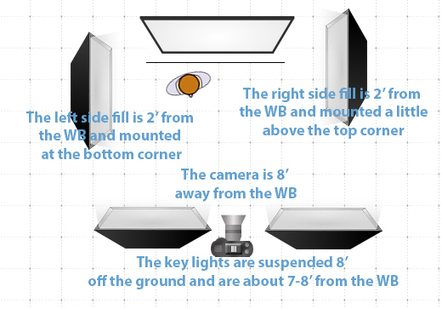
Robin Good: This video tutorial provides plenty of good tips, suggestions and examples of light accessories you can use to better control your studio lights when shooting.
"When preparing for an on-camera, professional interview, it is important to try to get the most out of the lighting you are using. In this episode, Rich demonstrates how to get the best skin-tone, hair light, and background light by using different light modifying techniques. Learn how to use lighting accessories such as gels, dimmers, flags, reflectors, and cookies to get a great-looking interview."
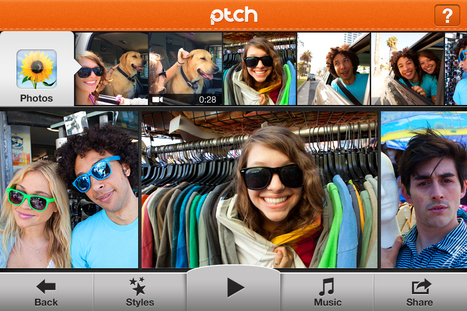
Robin Good: Ptch is a new iOS app which allows you to "style" and easily share with your friends, short 60-seconds photos and video clips.
From Fast Company: "Ptch picks up where your static photo feeds on Instagram, Tumblr, Twitter, Viddy, Facebook, and Google+ leave off.
Dreamworks, the animation studio behind Shrek, is backing the iOS app, which launches today and lets users create, edit, and share 60-second mini-movies from their own photos and video clips.
Then comes the movie magic. Ptch helps users add title cards, offers soundtrack help with one of more than 80 preloaded songs, and even integrates comments from your social networks.
Like other outfits that do Instagram-like treatments for video, Ptch lets mini-movie makers wrap their creations in one of eight styles. You can share new creations on Ptch, as well as on your desired social channels."
Robin Good: Vyclone is a new free iPhone app which allows you to include and remix your own video footage with the ones of your friends recording the same event.
Vyclone synchronizes and edits everyone's clips to create one movie with all the angles cut together. The good thing is that you get the raw footage too. "So if you like, you can remix it to make your own director's cut."
Mashable writes in its review: "...the app lets two or more users create a collaborative video with others who are also shooting an iPhone video in physical proximity to them even if you’re not friends with or even aware the other people are shooting a video. The result is an almost instant multi-angle video of an event that you’ll swear was created by a professional video editor."
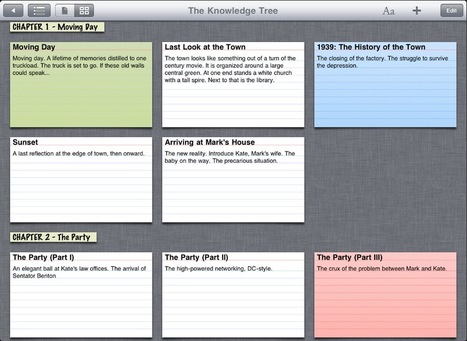
Robin Good: Storyist is a Mac app designed to produce submission-ready manuscripts and screenplays that is now available also as an iPad app.
"Storyist provides a rich text editor with support for comments, images, headers, footers, and style sheets so you can create properly formatted manuscripts and screenplays. And Storyist comes with manuscript and screenplay templates so you can focus on the writing, not the formatting."
Key features:
-> Automatic manuscript and screenplay formatting.
-> Text Inspector for quick editing of formatting, style, and page settings.
-> Wireless printing with AirPrint.
-> Index card view with support for color-coding.
-> Customizable plot, character, and setting sheets.
-> Works great with the Apple iPad Keyboard Dock and Bluetooth wireless keyboards.
-> One-tap Dropbox sync.
-> Files compatible with Storyist for Mac.
-> Easy import and export of Storyist, RTF, Plain Text, and Final Draft v8 files via iTunes, Dropbox, and the Open In menu.
Robin Good: Useful guest post by Deepak of VideoMarketing.net on Problogger for anyone trying to improve the visibility and findability of their YouTube video content.
Robin Good: If you want to understand how you can make sure that your customers will see as much as possible what you have been seeing on your screen, this is a good, simple and informative article to read.
It explains the relevance of "gamma" and how this value is interpreted differently by different video players (Windows Media Player, QuickTime Player, VLC, etc.) while also showing some valuable proof of what could be the best approach (recommend all your viewers to get and use VLC).
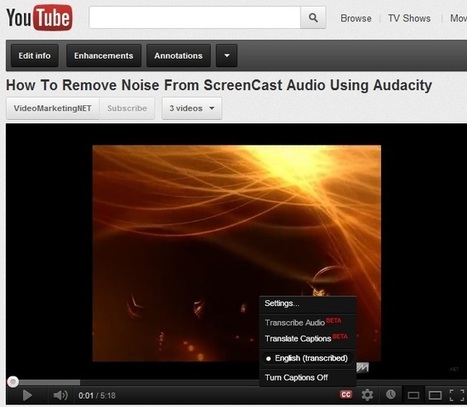
Robin Good: Amara / Universal Subtitles is a free web-based service that allows anyone to easily sub-title and add captions to any video.
As long as you have a URL of a published video, Amara makes it very easy to caption it. The clip may be on a video sharing site or embedded in custom video player and Amara can still get to it.
Amara is made up of three main parts:
a) A subtitle creation and viewing tool (aka the widget)
b) A collaborative subtitling website
c) An open protocol for subtitle search/delivery
All tools inside Amara are free and open-source.
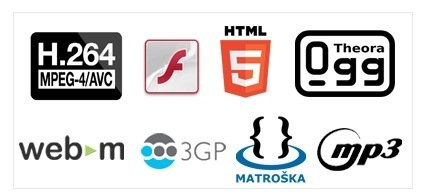
Supported video players and video sharing sites include:
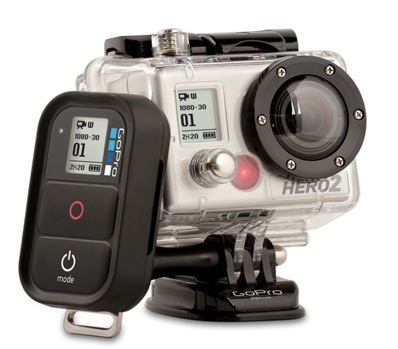
Robin Good: While back in October '11 GoPro had already released a first option for the GoPro Hero 2 that allowed direct live video streaming over WiFi, now the company has made available a full WiFi Bacpac and WiFi Remote combo which provide some really unique additional features to these already excellent portable camcorders.
Here the key features offered in this kit:
____________ Wi-Fi REMOTE
-> Control up to 50 cameras a time from up to 600’/ 180m away with the Wi-Fi Remote
-> Enjoy full camera control, including ON/OFF, SHUTTER and SETTINGS control
-> LCD screen mirrors your camera’s status LCD screen
-> Attachment strap, key ring, and charging cable included
-> Waterproof to 10′/3m
_________________________________ GoPro APP + SMARTPHONE OR TABLET
-> Use your Smartphone or Tablet as a live video remote control
-> Enjoy convenient live video + photo preview and playback
-> Wi-Fi transfer your favorite videos and photos from your GoPro to your Smartphone or Tablet and share with friends
-> Use your Smartphone as a hotspot to live stream video and share photos + videos to the web
____________________________________ LIVE STREAMING DIRECTLY FROM YOUR GOPRO
Live stream video or share photos and videos directly to the web from your GoPro, wherever you have a network connection
From Kickstarter another great gizmo for video-makers and photographers: "Astro adds pan & tilt movement to your camera, and it allows you to set up time lapse programs by defining the duration, the range of movement; which goes from 0 to 360°, and the interval in degrees or seconds in which you want the photos to be taken."
"The most intuitive, compact and simple intervalometer + motion control for timelapse photography"
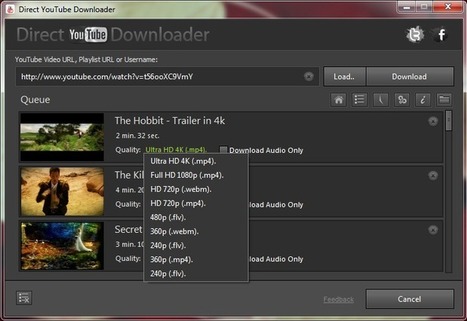
Robin Good: Direct YouTube Downloader is a free downloadable Windows-only software that enables you to download and convert online videos from YouTube and other sites.
Direct YouTube Downloader allows you to download entire YouTube Channels, playlists or user's videos, including video clips in Ultra HD 4K, 1080p and 720p video resolutions.
Robin Good: The Picosteady is a lightweight and low-cost steadycam for any iPhone, small helmet cam like the GoPro or the Hero, and also for many DSLR cameras.
Started through a Kickstarter project it has already reached full funding but you can still chip in to get it as soon as it becomes available.
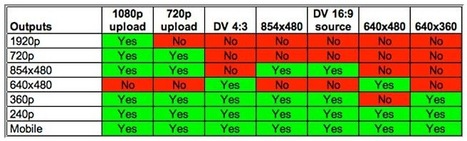
Robin Good: If you have been spending countless hours trying to figure out by yourself what are the best encoding settings to use for uploading video to YouTube, this video guide has all the info and tips you may need.
The guide covers lots of useful ground, provides some very useful reference tables, and goes over 1080p and 720p encoding, SD resolution, data-rates, key-frame interval, audio quality settings, and a lot more.
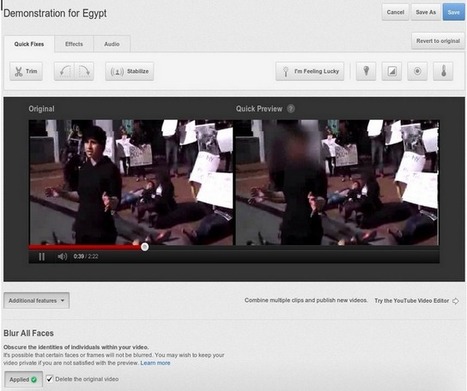
Robin Good: YouTube has just released a "face-blurring" tool that can be utilized on any video uploaded to the platform.
"Whether you want to share sensitive protest footage without exposing the faces of the activists involved, or share the winning point in your 8-year-old’s basketball game without broadcasting the children’s faces to the world, our face blurring technology is a first step towards providing visual anonymity for video on YouTube..."
Here's how it works: "Blurring faces on YouTube is simple. Once you’ve chosen the video that you’d like to edit within our Video Enhancements tool, go to Additional Features and click the “Apply” button below Blur All Faces.
Before you publish, you will see a preview of what your video will look like with faces blurred. When you save the changes to your video, a new copy is created with the blurred faces.
You will then be given the option to delete the original video."
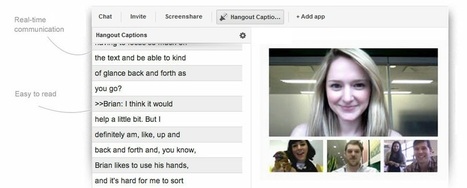
Robin Good: Hangout Captions is a new experimental app for Google Hangouts that allows you to add a real-time text transcription of what is being said inside the Hangout.
The text transcription is displayed next to the event allowing deaf or hearing-impaired participants to read and understand fully the topic being discussed.
"“By adding the +Hangout Captions app, you can either connect live text from a professional transcriptionist to your Hangout, or type right into a text box yourself to transcribe a Hangout for your friends,” Naomi Black, technical program manager for accessibility engineering wrote in a post on Google+."
"You’ll only be able to see a transcription in the Hangout Captions side panel when someone in the Hangout is providing the transcription; either through live stenography (CART or palantype) or by simply typing into the app. Live transcription isn’t automatic."
"Hangout Captions is an app that connects live transcription services directly into a Google+ Hangout, improving accessibility for participants who are deaf or hard of hearing."
P:S.: In late May, Google added the ability to add captions to videos uploaded to Google+.
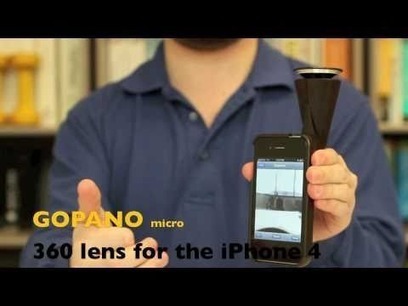
Robin Good: If you are looing for the best and most interesting appcessories for your creating viddeo with your iPhone (or iPad), here is an excellent guide by Diana Faustmann, covering some of the best tools available out there.
The focus of this set of mini-reviews is on:
-> 360° panoramic photo and video imaging
-> Robotic panning and framing of subjects, and
-> Remote trigger control of an SLR/DSLR cameras.
Included are also links to helpful technical and user reviews, where available.
Robin Good: The Source Filmmaker (SFM) is a story-telling movie-making ecosystem built around Valve Source Game Engine.
SFM allows the user to tap into all of scenes and components of an existing 3D game, to create, re.animate, and re-combine characters, movements and plots in any imaginable way.
"The SFM allows a storyteller to create an entire movie on location inside the video game world of Team Fortress 2. Movies exported with the SFM can be uploaded to the web or shared like any normal movie file."
Unlime most other 3D cinematographic tools which typically take care of only a part of the movie production (renderer, 2D video clip editor, a keyframer, a motion capture editor, a sound editor, etc.) the SFM is a hybrid of all these workflows merged into a single system, where you can create an entire movie by reusing assets and events from the video game world.
"Because the SFM uses the same assets as the game, anything that exists in the game can be used in the movie, and vice versa. By utilizing the hardware rendering power of a modern gaming PC, the SFM allows storytellers to work in a what-you-see-is-what-you-get environment so they can iterate in the context of what it will feel like for the final audience."
You can apply for a beta key here and install it from Steam like any other free-to-play game. Note that the beta key request requires Steam to be running on your PC.
Robin Good: Veo Video Converter is a web app that allows you to easily convert any video into just about any other video format, resolution or device standard.
Your input video, yet to be converted can be either uploaded or provided via a URL if it is already published on the web. Clips available on YouTube, Vimeo and DailyMotion are all supported.
In addition, Veo Video Converter provides you with a list of useful conversion presets that offer a wide array of final output formats for any use or device. You can easily convert videos online to a MP4, AVI, 3GP, OGV, MPG, WebM, FLV, and several other formats, including .mp3 audio.
Finally, you can upload your video directly to video social networks as YouTube or to your S3 Amazon account.
Free to use, requires no registration or download, though you have to provide an email to receive the converted video.
Robin Good: An excellent video shootout of the two top HDSLR video cameras on the market. See image quality, noise and other weak points analyzed in detail and get an overall picture of what is better for your needs.
Robin Good: Intervista Doppia (Double Interview) is a new iOS app, which allows you to record a double, side-by-side video interview directly from your iPhone.
Side-by-side video interviews are characterized by a set of common questions directed at the two selected interviewees, who appear in two video windows next to each other and who respond in turns to them.
The finished video can be easily shared on Facebook and Twitter and it is also saved as a modified .mov encoded in AAC/H.264 at 480x360 resolution.
The app costs 1.59€ and is available in the App Store.
To get content containing either thought or leadership enter:
To get content containing both thought and leadership enter:
To get content containing the expression thought leadership enter:
You can enter several keywords and you can refine them whenever you want. Our suggestion engine uses more signals but entering a few keywords here will rapidly give you great content to curate.


 Your new post is loading...